Run pay-per-use compute jobs directly from your editor with Ocean Orchestrator

Works with Cursor, VS Code, Antigravity, and Windsurf

Pay-per-use escrow payments
Pick resources before you run, with no forced bundles
Results saved locally
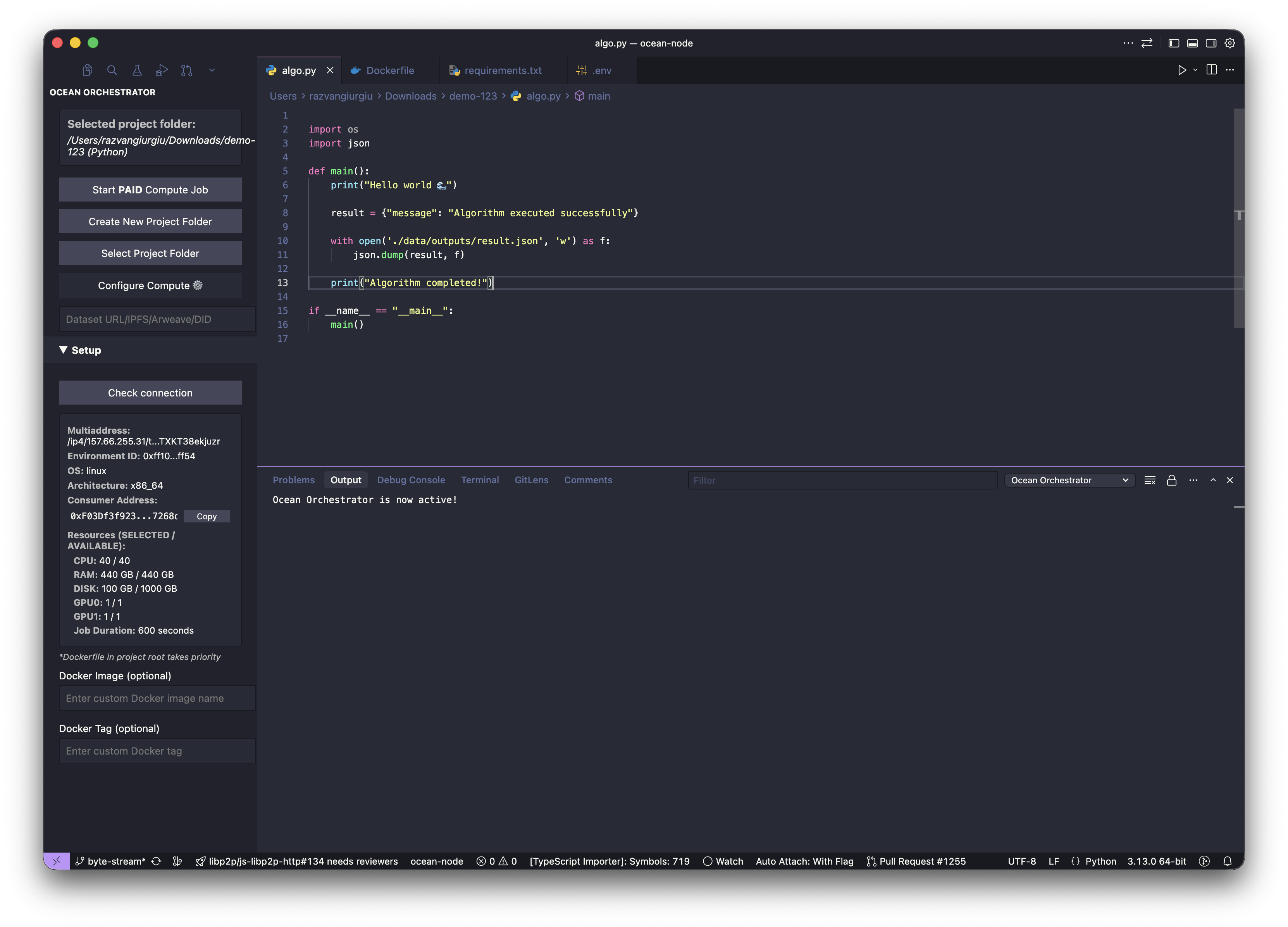
algo.py — ocean-node
Ocean Orchestrator
Project: /demo-123
Start PAID Compute Job
Select Project Folder
Configure Compute ⚙
CPU: 40 / 40
RAM: 440 GB
GPU: H200 · 2/2
Region: East Asia
Est. cost: $2.16/hr
 1import os
 2import json
 3
 4def main():
 5    print("Running inference...")
 6    result = {"message": "Completed"}
 7    with open('./data/outputs/result.json', 'w') as f:
 8        json.dump(result, f)
 9    print("Algorithm completed!")
10if __name__ == "__main__":
11    main()
$ ocean job start
✓ Connected to Ocean Network
chicken-tennessee-hawaii-seven · H200 · Kyoto
Cost estimate: $2.16/hr
✓ Job dispatched · job_a8f2c1
[████████░░] 82% · 4m 12s
Job running on H200 · $2.16/hr · results → ./outputs/
Code-to-Node
Pay-per-use
Escrow Protected
Run from your editor
No idle costs
GPU compute
VS Code · Cursor · Windsurf · Antigravity
Results saved locally
One click launch
Ocean Network
Code-to-Node
Pay-per-use
Escrow Protected
Run from your editor
No idle costs
GPU compute
VS Code · Cursor · Windsurf · Antigravity
Results saved locally
One click launch
Ocean Network
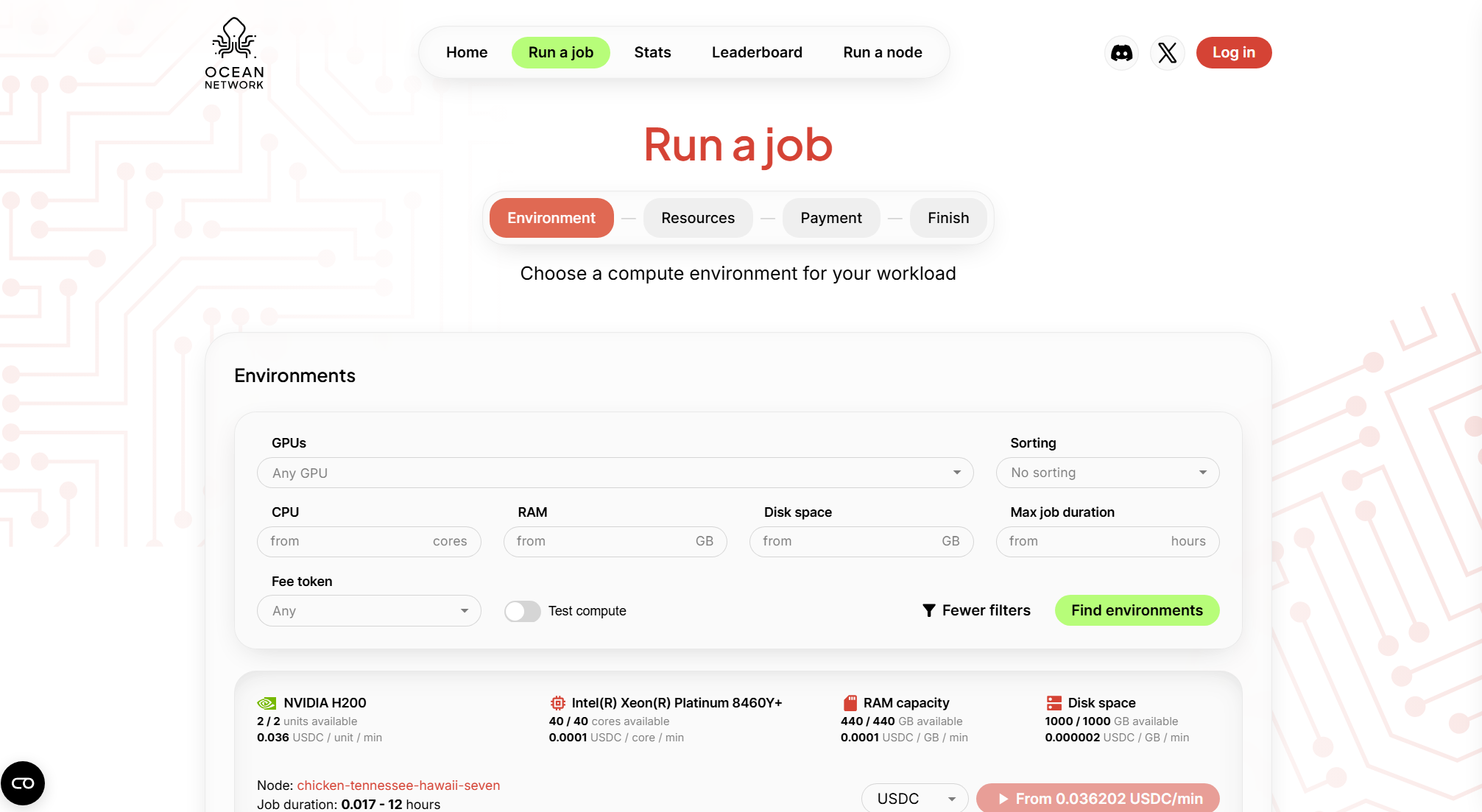
Pricing

GPU pricing and availability

Selected the resources that fit your run

Node Envs
GPU
RAM
CPU
Disk Space
Price *starting from
Run a Job
Env 1
H200 SXM5
440 GB
40 vCPUs
1000 GB
$2.16/hr
Env 2
H200 SXM5
440 GB
40 vCPUs
1000 GB
$2.16/hr
Env 3
H200 SXM5
440 GB
40 vCPUs
1000 GB
$2.16/hr
Env 4
H200 SXM5
440 GB
40 vCPUs
1000 GB
$2.16/hr

Dashboard → Editor → Outputs

Dashboard

Choose environment and resources

Editor

Ocean Orchestrator, Start compute job, view logs

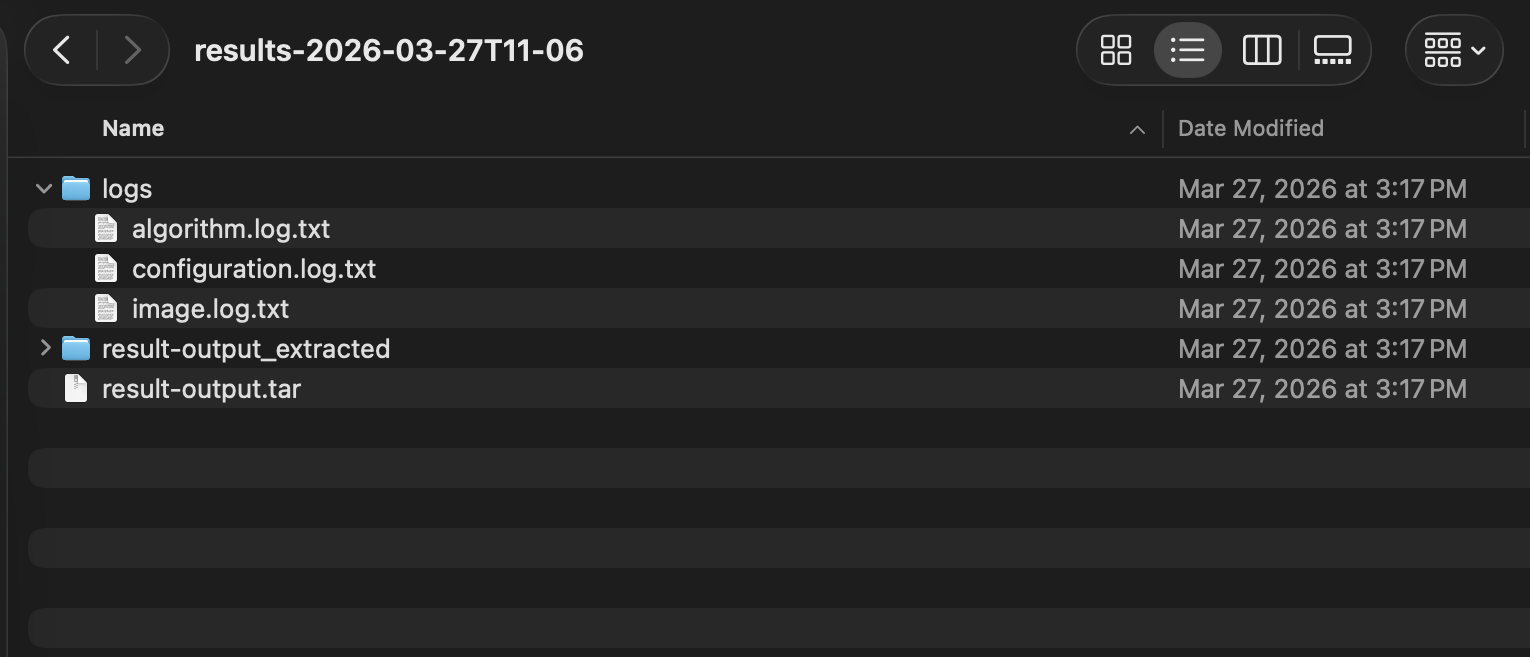
Outputs

Results and logs saved to your folder

Why It Matters

Stop losing time before the run

For most users, the hard part is not the code. It is the setup: provisioning, dashboard hopping, resource guesswork, and paying while infrastructure sits idle.

Ocean Orchestrator is built to keep momentum

i
No manual infrastructure setup. No cloud console hopping.
Traditional cloud workflow With Ocean Orchestrator + Ocean Network
Manual setup before any job runs Start in the dashboard, choose resources, then launch from your editor
You pay for idle infrastructure even when nothing is running Pay-per-use escrow mechanism that charges you upon successful completion of the job
No cost visibility until the bill arrives at the end of the month See resource options and estimated cost before launch
Switching GPU types requires re-provisioning from scratch Choose the resources you need before each run without doing the whole flow
Results require manual retrieval from remote storage Outputs and logs are saved automatically to your local results folder
How It Works

How it works

01

Pick environment and resources in the dashboard

No forced bundles, choose exactly what your workload needs.

02

Fund your escrow wallet

Funds are held securely and released only after your job completes.

03

Choose your editor and open Ocean Orchestrator

Works with VS Code, Cursor, Windsurf, and Antigravity.

04

Start compute job, monitor logs

Launch with one click and track progress live in your editor.

05

Outputs land back in your local folder

Results and logs are saved automatically — no manual retrieval.

No server setup. No cloud console hoppin
Ocean Orchestrator — Terminal
$ ocean gpu list --type h200
✓ 4 environments available
Env-1 · H200 · Amsterdam · $2.16/hr
Env-2 · H200 · Frankfurt · $2.16/hr
$ ocean job run --env Env-1 --budget 10.00
Escrow funded: $10.00
✓ Job dispatched — job_a8f2c1
[██████░░░░] 62% · 6m 44s
✓ Complete · $4.32 charged · results saved
$
HOW IT WORKS

How it works

Ocean Orchestrator — Terminal
Payments

Pay-per-use, escrow protected payments

Run a Job

Funds locked in escrow

Budget is set before the job starts. Funds held securely in the escrow contract.

Job executes

Your containerized workload runs on the selected node. Progress tracked live.

Job marked as completed

Completion is verified before any payment is processed.

Payment released

Exact runtime cost released. Any remaining balance returns to your wallet.

Use Cases

Orchestration for real workflows

01

Batch runs that finish

Run inference over large input sets and pull back clean outputs and logs.

02

Embeddings and data prep

Turn raw data into artifacts your app can ship with.

03

Training and eval loops

Rerun the same job with different resources and iterate faster.

FAQ

AI workflows,simplified.

Clear answers so you can run AI jobs with just one click

How do I run my first job?

The quickest way to run your first compute job is to use the Ocean Network dashboard: select the resources you need, then push them to Ocean Orchestrator (you’ll be prompted to install it if you haven’t). Ocean Orchestrator works in VS Code, Cursor, Antigravity, and Windsurf.If you prefer CLI, you can use ocean-cli to submit the job and pull results when processing is complete.

What types of workloads can I run on an Ocean Node?

You can run containerized compute jobs like embeddings, model inference jobs, data cleanup, batch processing, and fine-tune model workloads that finish within the job window and produce outputs you can download.

What happens if a node fails during my job?

Ocean Nodes are designed to manage failures locally, keeping compute job execution predictable and controlled. If a node goes down mid-run, the job can be restarted on the same node once it becomes available again. Funds are released from escrow only when the node explicitly marks a job as successful.Rerouting is handled by the user, in line with the Ocean Network ethos of giving users full control over which resources are used.This differs when a failure is caused by the algorithm itself. In that case, the job is treated as unsuccessful because the execution failed, not because the node was unavailable. See the dedicated FAQ for algorithm failures.

Do I need to set up servers as a compute user?

No. This is no server setup and serverless GPU compute: you choose a preferred Ocean Node with the resources you need, submit a containerized job, and get results back without managing servers or infrastructure

Is there free compute available?

Yes, we have 3 types of free compute. Test CPU compute enviroemnts offered by Ocean Network, Complimentary Credits which gives you access to GPU compute and lets you use resources for $100 USD. The third type of test compute enviroments is the one that can be offered by node operators for the purpose of showcasing their resources for users to experiment with.

How does job scheduling work on Ocean Network?

Ocean Network does not auto-assign your job to random machines. You pick the node or compute environment you want based on resource price limits and current availability, then submit the job to that specific resource. If it is busy, your job waits until that node becomes available. The dashboard shows availability and max duration per environment, so you can choose predictable compute up front

Run your next AI jobdirectly from your editor

Pick resources, run your job in Ocean Orchestrator, pull outputs back locally, everything with a pay-per-use workflow.