

.jpg)
For many AI developers, the real bottleneck isn’t building models, it’s managing infrastructure.
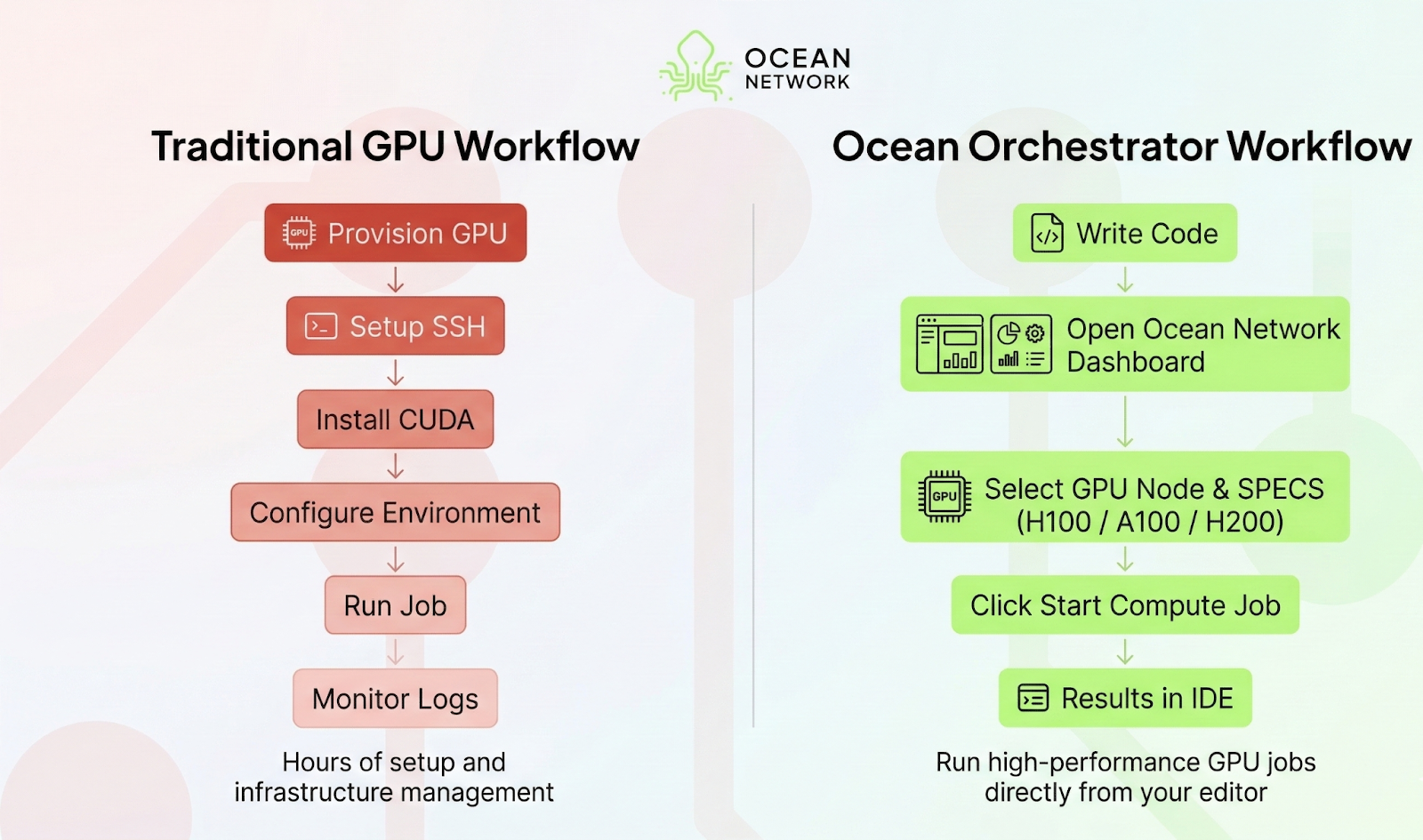
Provisioning cloud instances, configuring CUDA drivers, managing SSH keys, and maintaining GPU environments can consume hours of valuable development time. Even worse, when a training run finishes or a pipeline pauses, those expensive GPUs often sit idle while the billing meter keeps running.
This mismatch between how AI workloads behave and how infrastructure is priced creates what many developers quietly experience as an “infrastructure tax.”
At the same time, thousands of GPUs around the world sit underutilized. Machines owned by research labs, independent operators, and compute providers often remain idle despite growing demand from developers who need access to powerful hardware.
This is the coordination problem of compute.
Ocean Network addresses this problem by connecting global GPU supply with developer demand through a decentralized compute network.
At the center of this system is Ocean Orchestrator, a developer-friendly workflow layer that allows you to run high-performance compute jobs directly from your editor without managing infrastructure.
What is Ocean Orchestrator?
Ocean Orchestrator is a workflow layer embedded directly into modern development environments, including VS Code, Cursor, Windsurf, and Antigravity.
It connects your local workspace to the global P2P compute Network and handles the entire lifecycle of a compute job automatically.
In practice, it acts as a smart compute execution agent that:
- Runs AI jobs from your editor
- Packages your code, dependencies, and inputs into isolated containers
- Matches your workload with an appropriate compute node
- Executes the job remotely on high-performance GPUs
- Streams logs and synchronizes outputs back to your local workspace
Behind the scenes, however, your jobs run on Ocean Nodes, operated by independent providers contributing compute resources to the network that process these workloads and earn rewards for executing jobs. These nodes compete on performance and pricing, creating a dynamic marketplace for compute.
In short, the Ocean Network turns geographically distributed GPUs into a global compute fabric, and Ocean Orchestrator brings that compute layer in your IDE
The One-Click Workflow
The design philosophy behind Ocean Orchestrator is simple: running remote GPU workloads should feel as easy as running local code.
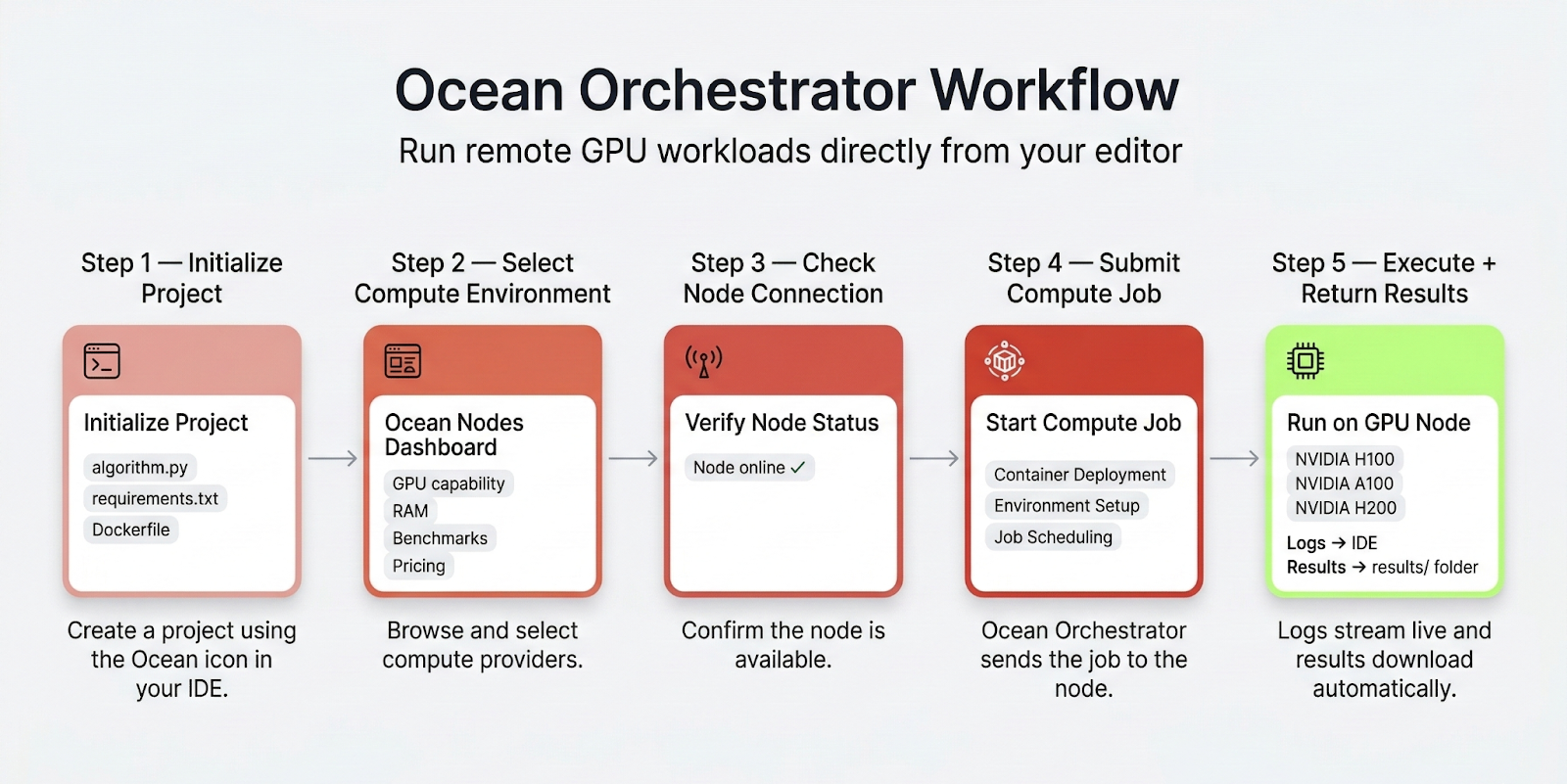
The full workflow typically looks like this:
1. Initialize Your Project
Click the Ocean Orchestrator icon in your IDE activity bar to create a new project. The extension automatically generates a standardized scaffold, including: algorithm file, requirements .txt, a dockerfile.
This eliminates the need to manually configure container environments or runtime dependencies.
2. Select Your Compute Environment
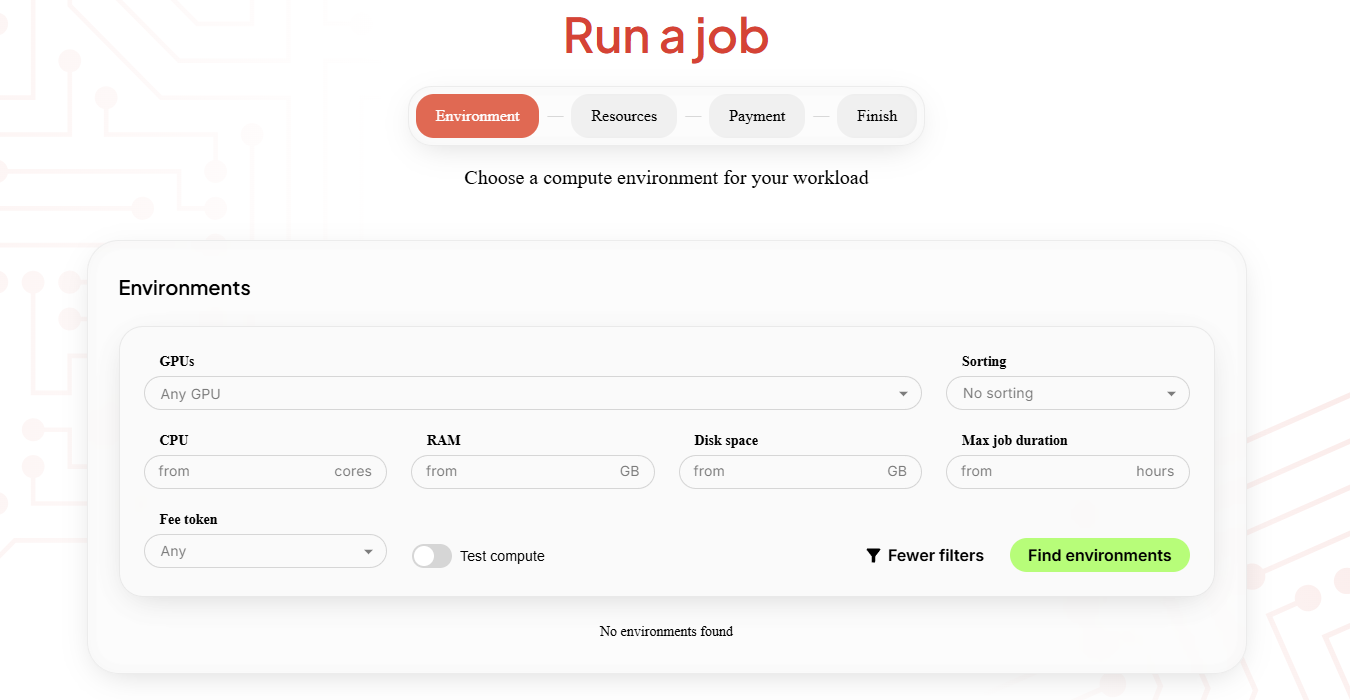
Using the Ocean Network Dashboard, you can browse available compute providers across the network.
Nodes can be filtered based on factors such as:
- GPU capability
- RAM availability
- performance benchmarks
- pricing
This allows developers to select the best price-to-performance option for their workload.
3. Check Node Connection
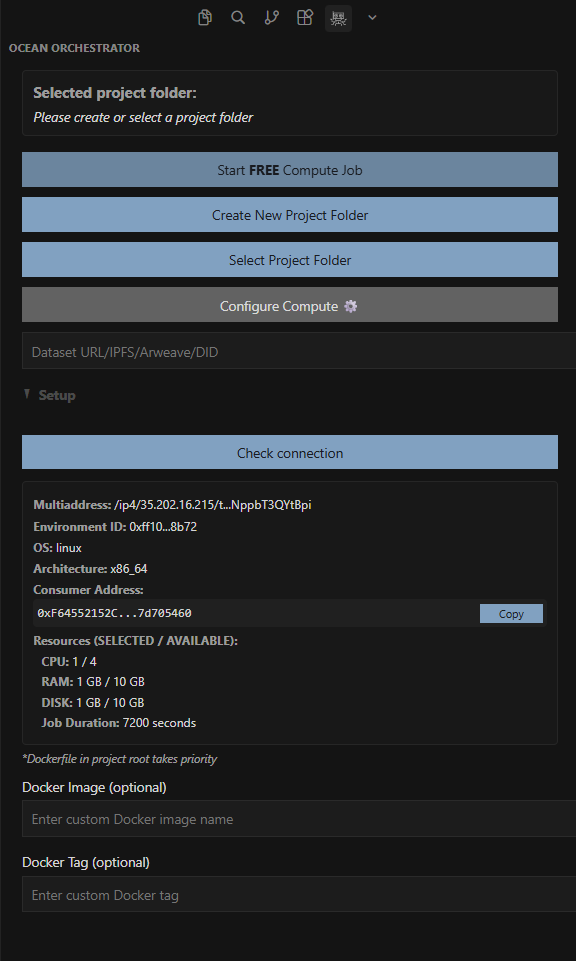
Before submitting a job, the setup panel allows you to verify that the selected node is online and ready.
A simple “Check Connection” command confirms connectivity and ensures the compute environment is available.
4. Submit the Compute Job
Once everything is configured, go back to your editor and click Start Compute Job. It sends your packaged workload to the selected node. Check our docs for commands to run your compute job in your editor
Behind the scenes, Orchestrator handles container deployment and environment setup. From the developer’s perspective, this process feels similar to launching a local script, but the compute runs remotely on powerful GPUs.
5. Monitor Execution and Retrieve Results
While the job runs, logs stream directly into your IDE’s output console.
When execution finishes:
- outputs are automatically downloaded
- results are stored locally in your results folder
No manual downloads, no SSH sessions, and no server cleanup.
What You Can Run
Ocean Orchestrator is particularly well suited for bursty, high-intensity workloads that require powerful hardware but do not need persistent infrastructure.
Common use cases include:
- Batch Inference
Run models across massive datasets without provisioning dedicated servers.
- Embedding Pipelines
Generate embeddings for large document collections used in retrieval-augmented generation (RAG) systems.
- Fine-Tuning
Train domain-specific models on high-VRAM GPUs that would otherwise be difficult or expensive to access.
- Dataset Preprocessing
Clean, transform, or structure large datasets that exceed the capabilities of local machines.
- GPU-Heavy Model Inference
Offload large language model workloads or complex inference pipelines to remote GPUs. Because jobs run as isolated compute tasks rather than persistent services, developers can scale workloads efficiently without maintaining long-running infrastructure.
Safety and Execution: Compute-to-Data
Safety is a foundational design principle of the Ocean Network. Instead of moving sensitive datasets across the internet, Ocean uses a Compute-to-Data (C2D) architecture.
In this model:
- your algorithm, data and other resources are packaged in a container
- computation occurs within secure containers on the node
At the end, only the results and logs return to the developer. This approach enables developers to run algorithms on private datasets without exposing the underlying data itself.
While the Ocean Orchestrator extension provides the most developer-friendly workflow, it is not the only way to interact with the network. Advanced users can also work with: Ocean CLI which is a command-line interface that enables publishing datasets, deploying algorithms, & orchestrating compute workflows directly from the terminal.
Ocean Orchestrator is also designed to be accessible even for developers with no prior experience using blockchain infrastructure. The network operates on the Base Network, an Ethereum Layer-2 that provides fast transactions, pay per use compute jobs with very low fees.
To simplify onboarding, the platform supports:
- Smart Wallets: Sign in using your Google account or email, no browser wallets or seed phrases required.
- Fiat On-Ramp: Purchase compute credits using familiar payment methods like credit cards
- Pay-per-Use Pricing: Instead of monthly subscriptions, you only pay for the compute resources you actually consume.
Limits and Best Fit
Ocean Orchestrator is designed specifically for job-based compute workloads. It works best when tasks have a defined beginning and end.
Ideal use cases are included in the “What you can run” section above. However, it is not designed for persistent services, such as:
- always-on web servers
- real-time APIs
- ultra-low latency applications
Instead, the system focuses on efficient job execution, spinning up compute resources when needed and shutting them down once the work is complete.
This model maximizes hardware utilization while minimizing cost for developers.
Getting Started
Running your first compute job takes only a few minutes.
- Install the Ocean Orchestrator extension from the VS Code Marketplace or Open VSX
- Initialize a project to generate the standardized compute scaffold.
- Browse available nodes on the dashboard to select a GPU environment.
- Submit your first job and watch the results stream back into your editor.
Once everything is set up, your code-to-node workflow is ready and you can start running remote GPU workloads. Follow us on X to stay updated on our upcoming announcements and features


